

FAB-DIS: Everything you need to know about the format – how to simplify and accelerate the adaptation of your product data
Created in 2015, the FAB-DIS format is today the standard for exchanging product data in the construction, industry, and infrastructure sectors. But how can you simplify and accelerate the adaptation of your data to this format? This article explores the best practices for creating compliant files using the Easy-Check by FAB-DIS certification and the importance of the FAB-DIS Inside certification.
Discover how to maximise the efficiency of your product data management with the FAB-DIS format.
1. What is the FAB-DIS format and why choose it?
This standardised file format was designed to facilitate the sharing of product information between manufacturers and distributors, particularly in the fields of electricity and construction. Developed by key players in this sector, it addresses three essential challenges:
- Reliability of exchanges: guarantee the transmission of exhaustive, qualitative, and well-organised product data between the different commercial partners, such as manufacturers and distributors.
- Reduced time-to-market: thanks to this standardised format, the integration of products into distributors’ catalogues is faster. A time saving estimated at 40% according to the FAB-DIS company.
- Regulatory compliance: FAB-DIS simplifies the process of bringing products to market. For example, by integrating constantly changing legal and normative requirements.
A model based on the Excel file format (XLSX)
The model relies on an Excel format (XLSX) file, structured into blocks that group together the essential data for the commercialisation of products:
- General product information: item code, label, short and long description.
- Technical characteristics: dimensions, weight, materials.
- Pricing: unit price, discounts, commercial conditions.
- Standards and certifications: regulatory compliance, CE markings, technical data sheets.
- Visuals and media: photos, videos, digital instructions.
Adopted by more than 1,200 companies, including leaders such as:
Delta Dore, Rexel, Acova, Leroy Merlin, Saint-Gobain, Pompac, Rexel, Sonepar, Algorel, SOCODA, Richardson, UGD, BigMat, L’Entrepôt du Bricolage, Legrand, Schneider Electric, Groupe Atlantic, GEBERIT, Soprema, and Hager.
FAB-DIS has become an essential standard for securing and simplifying product data exchanges.
In 2023, FAB-DIS continued to adapt to market requirements and evolved its format to version 3.0. It thus consolidates its position as the reference for the entire construction sector. This evolution facilitates format maintenance and still allows for smooth integration with modern systems, such as PIM (product information management), ERP, and e-commerce platforms.
Discover how Nicoll (Aliaxis group) benefits from the FAB-DIS format – Webinar Replay
2. Structure of a FAB-DIS 3.0 file: Everything you need to know
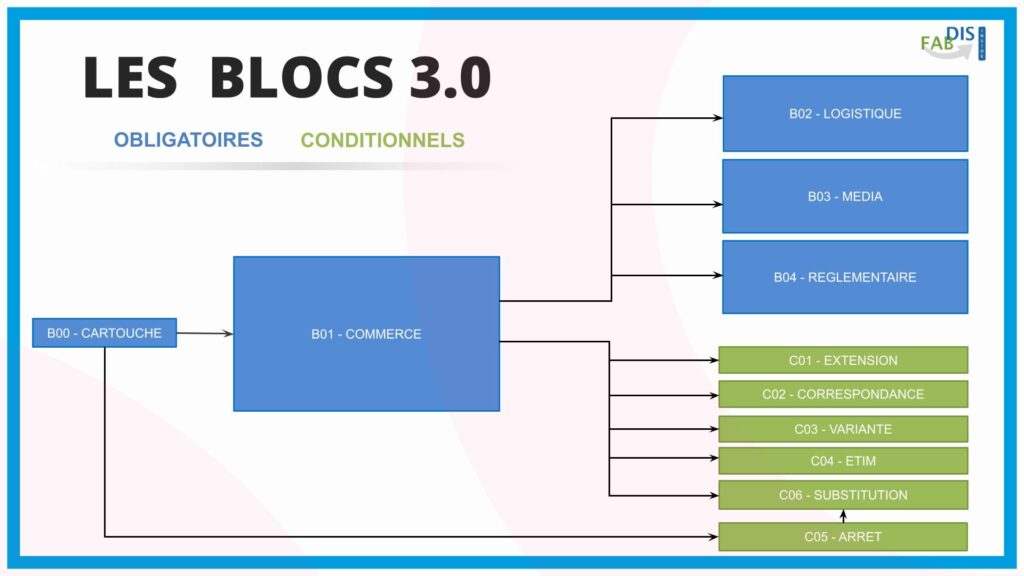
The FAB-DIS 3.0 format is organised into modular blocks, allowing for detailed and flexible management of product data. These blocks can be mandatory or conditional, depending on the information to be shared. Here is how these blocks are organised to meet the needs of manufacturers and distributors.
Mandatory blocks
B01 – Trade
This block lists commercialised references (items or services), with information such as base units, labels, and the product lifecycle. It allows for the management of the transition to discontinued or substitute products.
B00 – Cartridge
This block defines the issuer, brands, and parameters of the referencing data (type of edition, date, currency, etc.).
B02 – Logistics
This block contains detailed logistics data, including dimensions, weight, and multiple packaging types.
B03 – Media
This block promotes products through marketing materials (photos, videos, product sheets). It allows a specific language or target to be assigned to each media file.
B04 – Regulatory
It highlights product compliance with current regulations. For example, eco-contributions, repairability index, and carbon footprint.
Conditional blocks
C01 – Extension
This block extends the information in the Trade and Logistics blocks. It adds specifics such as “made in,” government aid, and multiple warranties.
C02 – Correspondence
It allows a reference to be linked to others to enrich the offer. For example, spare parts, consumables, or complementary products.
C03 – Variation
This block facilitates product selection based on predefined variation criteria, such as sizes, colours, or materials.
C04 – ETIM
It shares technical characteristics according to the ETIM standard, now integrated in its most recent version (ETIM 9.0).
C05 – Discontinuation
This block compiles references withdrawn from sale and allows information on their availability to be transmitted. Also for instructions and spare parts.
C06 – Substitution
It identifies the most relevant replacement product when a product is withdrawn or under maintenance.
2.1 FAB-DIS 3.0 – An evolutionary and flexible structure
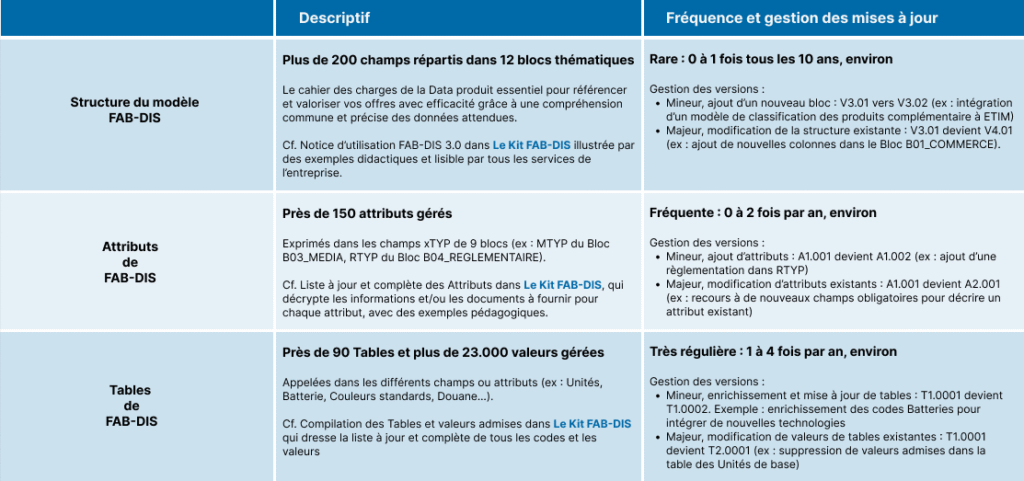
The FAB-DIS 3.0 format is designed to be durable while remaining flexible. It allows for easy integration of new requirements, such as adding attributes or values into blocks, without disrupting the existing structure.
This agility ensures fluid evolution while preserving the stability of the format for its users. This minimises the impact on their business activities.
3. Why create my files with a FAB-DIS Inside certified solution?
By opting for a solution validated by the FAB-DIS Inside partnership, such as MaPS System, you are choosing a platform that is compliant, intuitive, and perfectly adapted to the requirements implied by using the FAB-DIS 3.0 model.
This partnership guarantees several strategic advantages for your company, facilitating the management of your product files and optimising exchanges with your commercial partners:
Data compliance and security: MaPS System, through its data quality management features, guarantees the compliance of your files with the FAB-DIS 3.0 model. This eliminates frequent errors and ensures reliable exchanges.
Simplicity and process fluidity: Centralise your product data on a single reference platform. This simplifies the export of your catalogue and validation via Easy-Check by FAB-DIS without the need for development.
Quick and automated validation: Thanks to integration with Easy-Check by FAB-DIS, the validation of your files is instantaneous. You receive a unique compliance number, certifying the conformity of your data.
Personalised support and continuous update: The FAB-DIS Inside partnership ensures expert support. It keeps you informed of model changes and provides continuous expertise.
Data quality improvement: Thanks to the controls integrated into MaPS System, anomalies are detected and corrected directly within the source data, thus guaranteeing optimised files ready for compliant validation.
Furthermore, by choosing MaPS System support, you benefit from a platform that allows you to adapt to updates of the FAB-DIS format without impacting your processes, thus guaranteeing continuous compliance with the latest model evolutions.
Finally, with the FAB-DIS Inside solution, you benefit not only from guaranteed compliance with FAB-DIS model standards but also from a reliable, high-performance solution designed to facilitate your product data exchanges, while improving the efficiency, quality, and security of your processes.
Discover our FAB-DIS Inside certified solution
4. Common mistakes to avoid
Apart from its many advantages, adopting the FAB-DIS format can present certain challenges. Here are some common mistakes to avoid to ensure effective management of product files:
- Poor data structuring: Failing to respect the standardised structure of the FAB-DIS format can lead to import errors or incompatibilities with partners’ systems. It is crucial to strictly follow the format specifications to avoid these problems.
For example: Forgetting certain logistics data, such as a product’s dimensions or weight, will not necessarily block products from being put on the market. Consequently, this can lead to poor stock management or poor product presentation at the distributor. - Lack of data validation: Failing to verify data compliance before sending it can lead to errors, such as missing or incorrect information. Using a tool like MaPS System allows files to be validated before distribution.
For example: A product description exceeding the length authorised by FAB-DIS may cause a rejection upon import. - Forgetting metadata: Information such as units of measure, category codes, or links to product images are essential to ensuring data consistency. Omitting these elements can lead to misunderstandings and harm the quality of commercial exchanges.
For example: Not including the link to a product image prevents display on distributors’ e-commerce sites. - Ignoring updates: FAB-DIS files must be regularly updated to reflect product evolutions (price, new references, promotions). Failure to keep your files up to date can cause inconsistencies and delays.
For example: Not including a new product reference in an update can lead to a delay in availability in the distribution network.
Firstly, it should be noted that all these errors can be easily avoided by relying on suitable tools that help you maintain the necessary rigour in managing your product data. Secondly, implementing control processes, such as those offered by MaPS System, allows you to guarantee optimal compliance and anticipate errors.
5. How does Easy-Check ensure the compliance of my files?
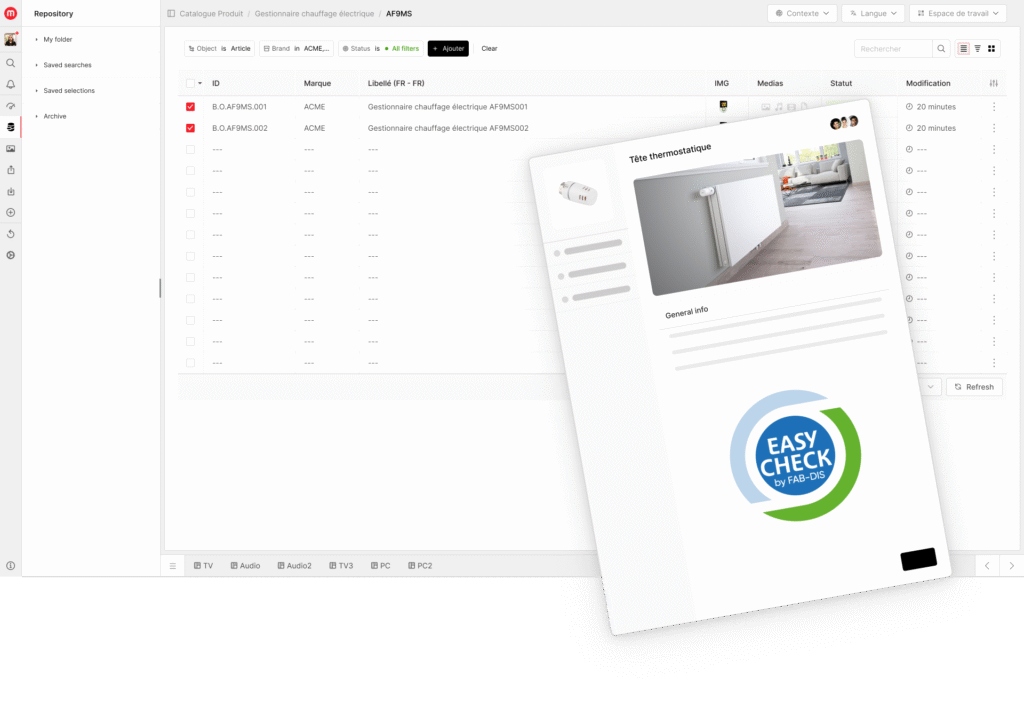
 Easy-Check by FAB-DIS is a control tool that allows you to improve the quality of your FAB-DIS files. It automatically detects anomalies in your files that may delay validation and therefore the launch of your products onto the market. The tool offers detailed reports to help you and guides you to correct errors.
With Easy-Check, you also obtain KPIs allowing you to prioritise the necessary efforts to improve the quality of your files.
Although this process is independent of MaPS System, even before generating your FAB-DIS files and submitting them to Easy-Check, the platform performs quality checks via its DQM (data quality management) module and verifies that all your data is complete and consistent to meet Easy-Check requirements.
Once this step is validated, you can create the FAB-DIS 3.0 file via the MaPS System data export tool, then submit your file to Easy-Check to finalise validation.
Nota bene: This functionality requires a subscription to Easy-Check PREMIUM. Nevertheless, this step is not mandatory to generate and use your files. To find out more, visit the Easy-Check platform.
The benefits for your company:
- Simplified syndication: data is automatically homogenised and ready to be shared with your distributor partners, eliminating file back-and-forth.
- Data reliability: thanks to the quality control of your data upstream of file creation, you ensure that product information is complete and ready for validation.
- Time saving: automated export in MaPS System allows for fluid and rapid export management, while offering you total autonomy in the creation and maintenance of your FAB-DIS files.
Adopting the FAB-DIS format, an undeniable asset.
In conclusion, FAB-DIS positions itself as the essential format for simplifying and accelerating the exchange of product data between manufacturers and distributors. By adopting this model and leveraging complementary tools like a PIM solution, you benefit from a standardised structure that reduces errors, improves the quality of information, and optimises the time required to bring your products to market.
To find out more about the implementation of the FAB-DIS format and discover how the MaPS System platform can support you in this process, please do not hesitate to contact us. We will help you take full advantage of the benefits offered by this exchange format.